Not being able to see the full document.
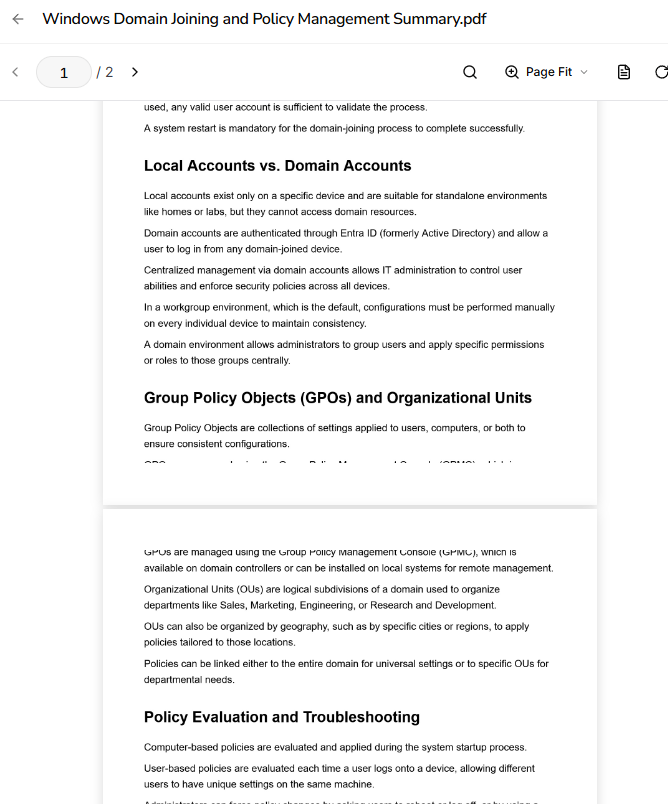
It seems as though I may have raised this issue up before. There seems to be and issue where sometimes a sentence doesn’t seem to be shown in the document and it seems to have split up onto towards the next page.
Comments3
Jason From Memo
Sep 27
The next step is to export a new PDF from the original note in Memo. Uploading the already-cut-off PDF again won’t restore the missing text. If a fresh export still cuts across a line, please send the notebook link and note name privately through support. I haven’t confirmed that your document is fixed.
Thanks!
Jason
Co-founder of Memo
Jason From Memo
Sep 26
The screenshot shows text cut across the page boundary. We released a notes PDF export fix on 25 September, but that does not change PDFs exported earlier.
Was this PDF downloaded before or after that update? Please try a new PDF export from the original note. If the new file still cuts the line, send the notebook link and note name through support so I can check that export. I haven’t confirmed that this particular document is fixed.
Thanks!
Jason
Co-founder of Memo
Aurora-Mage
Sep 26
This was after the update. If that was the case. So I may have to import the pdf again. Ok thank you Jason!